Why plan mode matters more than you think
Part of the Claude Code in Practice series
Series outline: 1. Why Claude Code is different • 2. How Claude reads your codebase • 3. Writing tasks Claude can complete • 4. Plan mode workflow • 5. Real-world scenarios • 6. MCP and skills • 7. Optimizing for speed • 8. Building your workflow
In every successful AI adoption I’ve observed, this is where teams start. Plan mode is what separates tools you can trust from tools that make you nervous. It is the difference between crossing your fingers and hoping the AI does the right thing, versus having a reviewable process where teams stay in control. Once engineers understand this workflow, adoption accelerates.
What is plan mode
Plan mode is a workflow where Claude explores your codebase, creates a detailed implementation plan, and waits for your approval before making any changes. You get to review what Claude intends to do, ask questions, request modifications, and only proceed when you are confident in the approach.
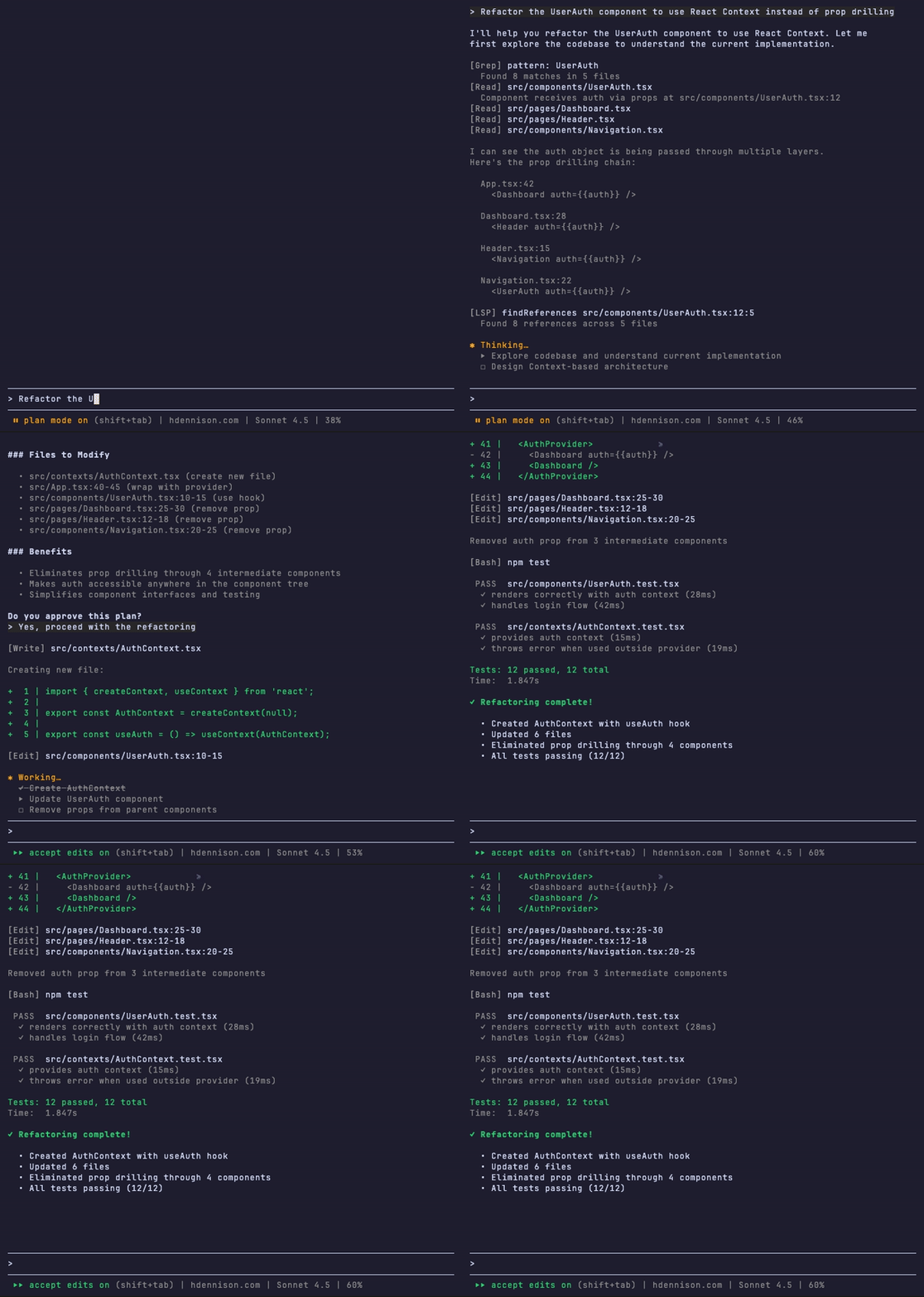
This might sound like extra overhead. Why not just let Claude start coding immediately? Because AI is not perfect. It makes assumptions, misunderstands requirements, and sometimes chooses suboptimal approaches. Plan mode catches these issues before they become bad code in your repository.
The planning phase
When you give Claude a task in plan mode, it starts by exploring. It searches for relevant files, reads existing code, understands patterns, and figures out what needs to change. This exploration is methodical. Claude uses the same tools you would use: searching for patterns, reading definitions, tracing dependencies.
Once Claude understands the codebase, it creates a plan. This plan includes what files need to change, what the changes will accomplish, and what approach it will take. The plan is written in plain language, not code. You can read it quickly and spot problems before any code is written.
Reviewing and approving plans
The review step is where you add judgment. You know things Claude does not: your team’s conventions, upcoming changes that might conflict, business constraints that are not in the code. Reading the plan takes seconds, but it can save you from costly mistakes.
When reviewing a plan, ask yourself:
- ✅ Does this change the right files?
- ✅ Is the approach sensible given our architecture?
- ✅ Are there edge cases or side effects Claude missed?
- ✅ Will this conflict with other work in progress?
If something looks wrong, you can ask Claude to revise the plan. If it looks good, you approve and Claude executes. You stay in control of what happens in your codebase.
Slicing plans into manageable chunks
Large tasks produce large plans. When a plan feels overwhelming, slice it. Break the work into smaller pieces that you can verify independently.
For example, if Claude plans to refactor an authentication system across 15 files, you might slice it into:
- Update the core auth module
- Migrate login and signup flows
- Update session management
- Migrate protected route components
Each slice is a complete, testable unit of work. You can verify each piece before moving to the next. If something breaks, you know exactly which slice caused it. This makes debugging trivial compared to reviewing one giant change.
The iterative workflow
Plan mode is not a one-shot process. It is iterative. The cycle looks like this:
- Describe the task to Claude
- Review the plan Claude creates
- Slice or modify if needed
- Approve and execute one slice
- Verify the results (run tests, check behavior)
- Repeat for the next slice
This cycle keeps you in control while letting Claude do the heavy lifting. You make decisions, Claude implements them. You verify results, Claude fixes issues. The partnership is clear: Claude handles tedious implementation details, you handle judgment and verification.
When to interrupt and redirect
Sometimes Claude gets stuck or heads in the wrong direction. Plan mode makes this obvious because you see the plan before execution. If the plan looks wrong, stop and redirect.
You can interrupt at any point to:
- Clarify requirements
- Suggest a different approach
- Point Claude to code it missed
- Simplify the scope
This is much better than letting Claude finish a wrong implementation and having to undo everything.
Course-correction without starting over
One of the best parts of iterative work is that mistakes are cheap. If a slice does not work as expected, you only need to fix that slice. The previous slices are already done and verified. You do not start over from scratch.
This is why slicing matters. Small units of work mean small units of correction. You maintain forward progress even when things do not go perfectly.
Why this beats “just let Claude do everything”
You might think giving Claude full autonomy would be faster. Just describe what you want and come back when it is done. In practice, this leads to:
- Changes you did not expect or want
- Code that works but does not match your patterns
- Missed edge cases that break production
- Time wasted undoing and redoing work
Plan mode trades a few seconds of review time for confidence in the results. You catch issues early when they are easy to fix. You guide Claude toward good solutions instead of hoping it guesses right.
The workflow feels slower at first, but it is actually faster because you avoid the costly mistakes that come from blind automation.
The key insight
Plan mode transforms AI coding from a gamble into a process. You stop hoping the AI does the right thing and start verifying it will. The plan → review → slice → iterate cycle becomes second nature. You work faster because you trust the process, not because you trust the AI to be perfect.
This workflow is how experienced Claude Code users work. It is the foundation for everything else. Master this, and the rest of Claude Code becomes easy.
Now that you understand the workflow, let’s look at real scenarios where plan mode shines.
Previous: ← Writing tasks Claude can complete | Next: Real-world scenarios →