Understanding how Claude Code explores your codebase
Part of the Claude Code in Practice series
Series outline: 1. Why Claude Code is different • 2. How Claude reads your codebase • 3. Writing tasks Claude can complete • 4. Plan mode workflow • 5. Real-world scenarios • 6. MCP and skills • 7. Optimizing for speed • 8. Building your workflow
When you ask Claude Code to refactor a component or fix a bug, it does not magically know your codebase. It reads and explores your code using specific tools, just like you would. Understanding this process helps you work with it more effectively.
The tools Claude uses
Claude Code has access to several tools for understanding your codebase. The main ones are:
Glob searches for files matching patterns. When you ask Claude to work on “all the React components,” it uses Glob to find files matching patterns like **/*.tsx or src/components/**/*.jsx. This is how it discovers what files exist and where they live.
Grep searches file contents for specific patterns. If you mention a function name or error message, Claude uses Grep to find where it appears in your codebase. This is similar to using rg or ag on the command line, but optimized for code exploration.
Read opens files and reads their contents. Once Claude knows which files are relevant, it reads them to understand the actual code. This is straightforward but important: Claude can only work with code it has actually read.
LSP (Language Server Protocol) provides code intelligence. It can find definitions, references, and type information. When Claude needs to understand how a function is used across your codebase, LSP gives it the same information your editor uses for “go to definition” or “find all references.”
Why Claude searches before acting
You might wonder why Claude does not just read everything at once. The answer is tokens. Every file Claude reads counts against the context window, which has limits. Reading your entire codebase would fill the context with irrelevant code and slow everything down.
Instead, Claude searches strategically. If you ask it to fix a bug in authentication, it first searches for auth-related files, then reads the relevant ones, then explores connected code as needed. This focused approach keeps context small and responses fast.
This is why understanding tokens matters. Every search result, every file read, every line of code adds to the token count. Claude balances thoroughness with efficiency, but you can help by being specific about what needs attention.
How exploration feeds into planning
When you give Claude a task, the first thing it does is explore. It searches for relevant files, reads the code, understands the structure, and identifies what needs to change. This exploration phase is not wasted time. It is how Claude builds the context needed to create a good plan.
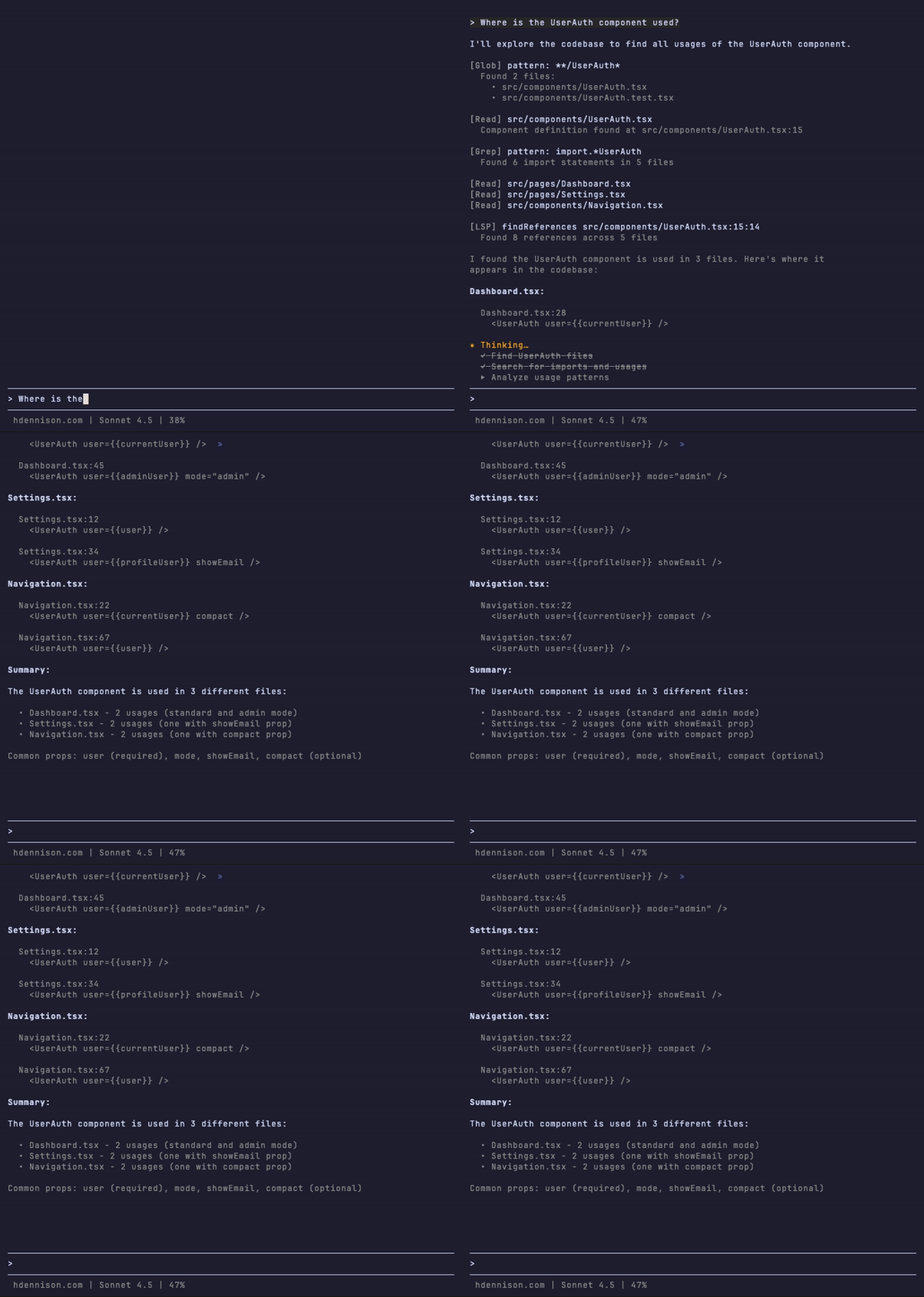
The plan is where exploration pays off. Instead of making changes blindly, Claude presents a plan based on what it found. You can see what files it identified, what changes it proposes, and what it might have missed. This is the key difference from tools that just start modifying code.
We will dig deeper into plan mode later in this series. For now, the important point is that Claude’s exploration is purposeful. It is gathering the information it needs to plan effectively.
How to structure codebases for better AI understanding
You can make Claude’s job easier by following standard conventions. If your files are named clearly, your folders are organized logically, and your code follows consistent patterns, Claude will find what it needs faster.
Here are patterns that help:
- Clear file naming that matches content (
UserProfile.tsxnotcomp_v2.tsx) - Logical folder structure that groups related code
- Consistent patterns across similar files
- Standard conventions that match the ecosystem (React components in
components/, tests next to source files, etc.)
These are good practices anyway, but they become more valuable when working with AI tools. Claude relies on patterns and conventions to navigate unfamiliar codebases.
The practical implication
Understanding how Claude reads your code changes how you ask for help. Instead of pasting file contents manually, you can describe what you need and let Claude find it. Instead of explaining your entire architecture, you can trust Claude to explore and ask questions if it gets stuck.
The key is knowing that Claude’s exploration is deliberate and limited by token constraints. It reads what it needs, when it needs it, guided by your task description. Learning to work with this process makes you faster and more effective.
But exploration is only the first step. To get good results, you need to frame tasks in ways Claude can actually complete. That is what we will cover next.
Previous: ← Why Claude Code is different | Next: Writing tasks Claude can complete →